
For freelance instructional designers and small L&D agencies
Professional e‑learning authoring, priced for freelancers.
Canvas for interactive slides and Flow for responsive lessons, in one browser tool. Import supported Storyline files with a report of every decision, check readiness and package SCORM, from a free plan.
Free plan · 3 active projects · no card required
Why freelancers and small agencies switch
Storyline-class interactivity, Rise-style speed, freelancer pricing.
No Windows desktop, no annual enterprise bill, and no starting over with work you already built.
- 01
Priced for project income.
Free to author, with no time limit. Create Pro is $19 a month or $190 a year. For comparison, Articulate 360 AI Personal is $1,449 per seat per year, annual only (checked November 6, 2026).
Create Free · live today
Plans and pricing - 02
Both editors, one browser tool.
Canvas for slides with triggers, states, layers, variables and a timeline. Flow for responsive lessons. One project, in the browser on Mac or Windows: no Windows virtual machine, no local project files.
Available
Canvas and Flow - 03
Honest way in, tracked way out.
Storyline import with a report entry for every decision, readiness checks that name the slide and the cause and SCORM 1.2, SCORM 2004, xAPI, cmi5 and web test packages.
Import, checks and test packages available
Switch from Storyline
The real product
One course, from slide to package.
Author in Canvas or Flow, preview it as a learner, fix what readiness finds, then download a test package. Switch views to see each step.
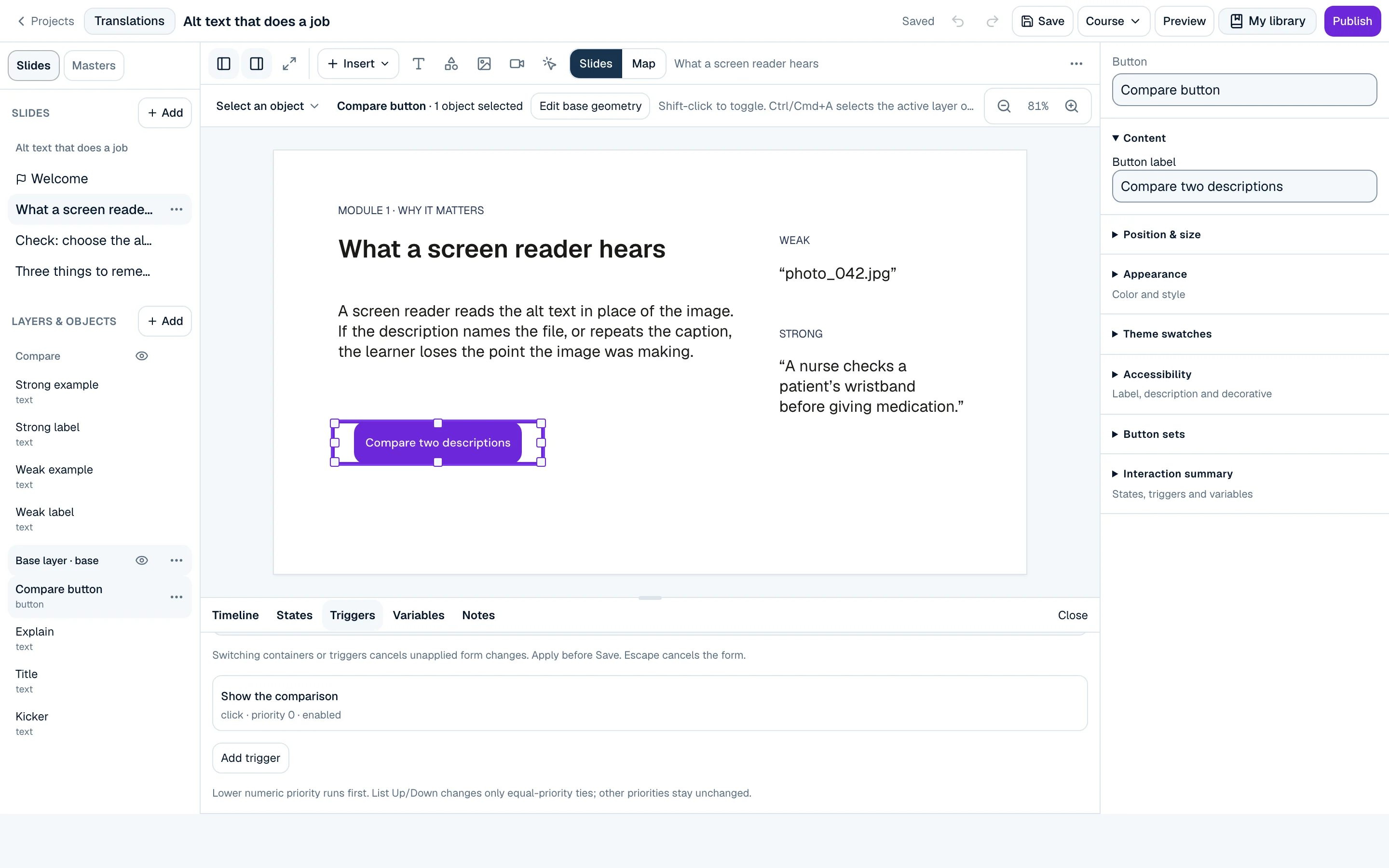
The Canvas editor on slide 2 of “Alt text that does a job”: the slide rail, layers and objects, and the Triggers panel with the button’s click trigger.
How it works
From file to package, in four moves.
Each step leaves something you can show a client: a conversion report, a saved draft, blockers and warnings and a sandbox package.
- 01
Import
Start from a supported Storyline file, company materials, or a blank Canvas or Flow course.
→ a conversion report
- 02
Author
Build slides with triggers, states and layers, or lessons from blocks.
→ a saved draft
- 03
Check
Run readiness to find missing captions, transcripts, alt text and labels.
→ blockers and warnings
- 04
Publish
Download a SCORM test package for your LMS.
→ a sandbox package
Two ways to author
Precise slides or responsive lessons. Same tool.
Canvas
Precise slides with triggers, states, layers and a timeline.
- Scenes and slides
- Triggers and conditions
- Variables
- Object states
- Slide layers
- Timeline and animation
Flow
Responsive lessons built from blocks.
- Lesson blocks
- Interactive blocks
- Knowledge checks
- Interactive video
- Themes
- Learner preview
What ships today
Everything Create does today.
Every area below is on for everyone in the current public release. New areas appear here when they ship.
- AvailableCanvasSlide-based interactive courses with triggers, states, layers, variables, masters and question slides.
- AvailableFlowResponsive, Rise-style lessons built from 30 kinds of text, media, interactive and knowledge-check blocks.
- AvailableStoryline importImport supported .story files as editable Canvas slides, with a report entry for every conversion decision.
- AvailableCompany materialsBring in PDF, DOCX or pasted text, inspect what was found and plan a Flow course from it.
- AvailableLibrary & templatesA personal library for saved slides and assets, curated templates, Openverse stock search and player themes.
- AvailableAccessibility & readinessReadiness checks that point at a slide and a cause: captions, transcripts, alt text, labels, contrast and keyboard access.
- AvailableLocalizationA translation editor with XLIFF export and import, and translated or multilingual packages.
- AvailablePublishingSCORM 1.2, SCORM 2004, xAPI, cmi5 and web test packages from the version you choose, and a Word review document.
Switching
Coming from Storyline, Rise, Captivate or Lectora?
Keep the way you think about courses. Canvas will feel familiar from slide authoring and Flow from block-based lessons. Supported Storyline files import, and the report tells you what to check.
Articulate, Storyline, Rise and Review 360 are trademarks of Articulate Global, LLC. Adobe and Captivate are trademarks of Adobe Inc. Lectora, CenarioVR and The Training Arcade are trademarks of ELB Learning. Allure Create is not affiliated with, endorsed by, or sponsored by Articulate, Adobe, or ELB Learning. Based on public information checked November 6, 2026.
Trust
Built for client work, where a wrong “done” costs you.
Saved means saved
The editor says Saved only after your work is stored. Until then it says Saving or Unsaved changes.
Reports hide nothing
Every import decision gets an entry, including what did not convert.
Only what ships
This site describes features that are on in the current release, shown with captures of the real product.
Checks name the cause
Each readiness finding names the slide, the object and why, so a fix is never guesswork.
Pricing
Free to author. Pay when the work ships.
Create Free includes the full core editor. Paid plans add production export, storage and client-delivery tools.
- Create Free
- $0
- 3 active projects · 5 test packages a month
- Create Pro
- $19/mo
- or $190 a year
- Project Pass
- $39
- one client project
Questions
Questions instructional designers ask.
Is Allure Create a replacement for Storyline?
Do I need to install anything?
Which LMSs does it work with?
Is there a free plan?
Will my courses be accessible?
Start free
Show the course, not a promise of it.
Start on the free plan: the full core editor, learner preview, 3 active projects, 3 Storyline imports a month and 5 SCORM test packages a month.